
- Posts: 700
- Thank you received: 181
📢 How to Subscribe to a Category and Get Notified of New Topics
- Brent Graham
-
 Topic Author
- Offline
Less
More
11 months 1 week ago #592
by Brent Graham
📢 How to Subscribe to a Category and Get Notified of New Topics was created by Brent Graham
A number of members have said they would you like to receive an email whenever a new discussion is started in your favourite part of the forum? Here’s how to do it 👇
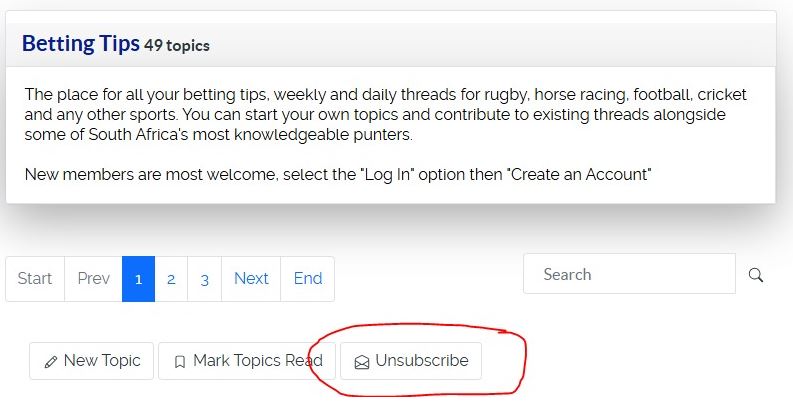
🔹 Step 1: Go to the Category
View on desktop
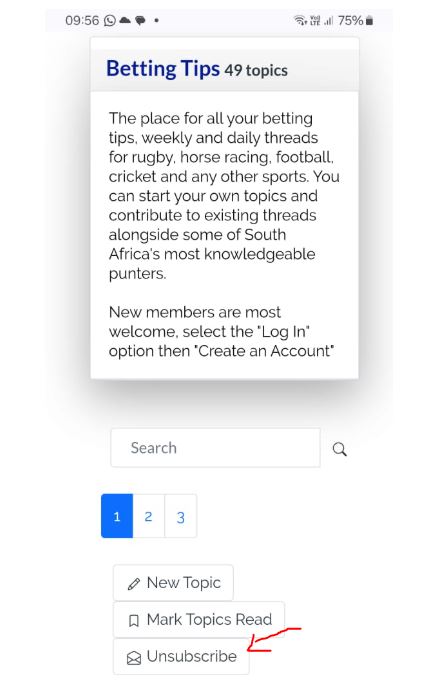
View on Mobile
🔹 Step 3: What Happens Next
🔹 Step 1: Go to the Category
- From the forum homepage, click into the category you want to follow.
(Example: “Betting Tips” or “Use Guide”)
- At the top right (or bottom right) of the category page you’ll see a button/link:
- Subscribe (if you’re not yet subscribed)
- Unsubscribe (if you’re already subscribed)
View on desktop
View on Mobile
🔹 Step 3: What Happens Next
- You will now receive one email each time a new topic is created in that category.
- You will not receive emails for replies unless you also subscribe to the topic itself (see below).
- When you open a topic, look for the Subscribe button/link.
- Or, if you post in a topic, leave the “Subscribe to this topic” box ticked at the bottom of the posting form.
- This way you’ll get an email when there are new replies in that topic.
The following user(s) said Thank You: Quill
Please Log in or Create an account to join the conversation.

- Brent Graham
-
Topic Author
- Offline
Less
More
- Posts: 700
- Thank you received: 181
7 months 1 week ago #2101
by Brent Graham
Replied by Brent Graham on topic 📢 How to Subscribe to a Category and Get Notified of New Topics
Hi Everyone,
We had an issue with the notifications but these should be resolved and if you subscribe to a category or topic you should start getting notifications.
If you don't please feel to send me a mail brent@goodforthegame.co.za
We had an issue with the notifications but these should be resolved and if you subscribe to a category or topic you should start getting notifications.
If you don't please feel to send me a mail brent@goodforthegame.co.za
Please Log in or Create an account to join the conversation.